Express NOA Log
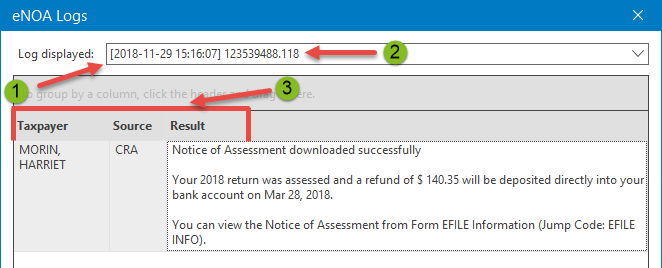
Immediately after an Express NOA download, the program displays a download log. This log can also be displayed to review prior download results. It contains the list of taxpayers for which a download has been performed and provides, for each taxpayer, the results of the operation. It provides the following information:
|
|
The date and time of the Express NOA download. |
|
|
The name of the client file in which the downloaded data was saved. |
|
|
For each error that occurred, the name of the taxpayer, the source of the downloaded data as well as a brief description of the result obtained. |


Notes: Personal Taxprep keeps all generated Express NOA download logs.
 How to display the Express NOA Download Log
If you want to consult a download log relating to a prior download performed for taxpayers in the current client file, proceed as follows :
- In the Tools menu, click Express NOA Download Logs.
- In the Log displayed drop-down list, click the Express NOA download log that you want to consult.