Release Notes
Overview – Version 2025 1.0
This version allows you to file most slips and summaries and transmit them electronically. It also allows you to file returns for registered charities. The forms for partnerships have not been approved by the tax authorities. Therefore, do not submit any partnership returns, T5013 slips or RL-15 slips prepared with this version to the CRA and Revenu Québec.
Essential Program Information
Taxprep Forms is the most complete electronic library of income tax forms in Canada. Three versions are available: the Gold version includes more than 475 slips and forms issued by the Canada Revenue Agency (CRA) and Revenu Québec (RQ), while the Silver version includes nearly 220 and the Bronze version, nearly 20. To view the content of your version, access the Forms view of the program (by selecting View/Form Manager). A list of the forms included in each version is also available in PDF format. You can consult this list on the Taxprep FormsProfessional Centre, (accessible from the Menu button at the top left corner of the program) under the “Documentation” section, or on the Taxprep Web site, at https://wolterskluwer.ca/products/taxprep/taxprep-forms/.
Forms and Slips Coverage
The slips, RL slips and summaries included in Taxprep Forms 2025 normally apply to the 2025 taxation year. You can nonetheless use them if you need to file a slip for the 2026 taxation year before the 2026 versions of the slips are made available by government authorities.
Individual forms can be used until they are updated by the CRA or RQ.
To know the release dates of the
Version 1.0 Content
Updates and Additions
To review the updates and additions contained in version 1.0 of Taxprep Forms 2025, consult the Updates and Additions table.
Version 1.0 – New Forms
Federal
T5013 Schedule 130, Partnership Interest and Financing Expenses and Interest and Financing Revenues (Jump Code: T5013S130)
The excessive interest and financing expenses limitation (EIFEL) rules limit the deductibility of interest and financing expenses by affected corporations and trusts. The rules apply to tax years starting on or after October 1, 2023. The main provisions for these rules are paragraph 12(1)(l.2), sections 18.2 and 18.21 and clause 95(2)(f.11)(ii)(D) ITA.
The new Schedule 130 is used to determine the allocation of interest and financing expenses or income to members of a partnership. The schedule must be completed if a partnership has a corporation or a trust as a member or deemed member under subsection 18.2(12) as well as interest and financing expenses or interest and financing income during the fiscal period.
However, if certain conditions are met, the partnership may be exempted from filing Schedule 130. For more details, please consult the Canada Revenue Agency’s website.
Amounts reported and allocated to members on Schedule 130 will be transferred to boxes 247 to 250 and 253 to 256 of Form T5013/RL-15 (Jump Code: T5013).
Québec
RLZ-11.P, Payment Relating to the Renunciation of Expenses or the Allocation of Assistance by a Corporation (Jump Code: RLZ11P)
This new remittance slip must be used when there is a balance payable on Form Renunciation of Expenses or Allocation of Assistance by a Corporation (Jump Code: RL11S). An optical recognition line and a payment code will then be generated on the remittance slip. However, this information will not be generated if an amount appears on both lines 20.6 and/or 25.6 and line 50 of Form RL-11.S. A diagnostic will then remind you to complete a separate Form RL-11.S for Part 5, Special tax on expenses deemed to have been incurred in Québec.
Finally, please note that Revenu Québec prefers online payments using the invoice with the payment code.
TP-21.4.39, Cryptoasset Return (Jump Code: TP21439)
Form TP-21.4.39 is a mandatory reporting form for any partnership that, in a given fiscal period, owns, receives, disposes of (sells, transfers, trades, donates, etc.) or uses cryptoassets. The capital gains (or losses), business income (or losses) and property income (or losses) from cryptoassets must be reported by type of cryptoasset. The partnership may incur penalties if it does not meet the obligations set out in Form TP-21.4.39.
TP-1079.8.BE, Foreign Property Return (Jump Code: TP10798BE)
This form is equivalent to Form T1135 (Jump Code: T1135) for Québec.
The information entered in Form T1135 is reported into Form TP-1079.8.BE.
For more information, consult the Help.
Version 1.0 – Updated Forms
Federal
Permitted characters when transmitting slips
This year, the CRA has provided specific instructions relating to the characters that are permitted when transmitting slips. The T1120 diagnostic has been added to several cells in order to guide the user as to which characters are accepted when transmitting. This diagnostic will be displayed whenever an invalid character is entered. This character will then need to be corrected before the slip is transmitted in order to avoid any errors.
GST525, Supplement to the New Residential Rental Property Rebate Application – Co-op and Multiple Units (Jump Code: GST525)
Form GST525 has been updated to reflect the enhanced GST/HST rebate for new residential rental properties, increasing the rebate rate from 36% to 100% for purpose-built rental housing, with no phase-out threshold.
Also, the boxes 14%, under an agreement entered into before October 31, 2007 and 15%, under an agreement entered into before May 3, 2006 have been removed from this form.
If you completed this form using a previous version of the program, please select 14% or 15% rates, if applicable, before filing it.
Finally, with respect to the GST/HST rebate calculation in Part B, the total of all units should be entered manually on line G of section 3, Rebate totals for application Type 6 and Type 7, when box Rebate calculation for Type 6 – Purpose-built rental housing has been selected.
R102-R, Regulation 102 Waiver Application (Jump Code: R102R) and R105, Regulation 105 Waiver Application (Jump Code: R105)
The checkbox Check this box if it is related to the FIFA World Cup has been added to section I, Applicant identification. This checkbox indicates whether the Canadian individual tax number (ITN) relates to the FIFA World Cup.
RC199, Voluntary Disclosures Program (VDP) Application (Jump Code: RC199)
New changes to the Voluntary Disclosures Program came into effect on October 1, 2025. These changes aim to make the program more accessible to taxpayers and to allow them to correct unintentional errors or omissions more easily. Most sections have been simplified; therefore, if information had been entered in a previous version, it will need to be reviewed before completing this form.
Taxpayers and registrants who are contacted regarding a potential non-compliance issue are now eligible for the program.
Following the update, each applicant must complete a separate application in section 1. From now on, only one applicant’s information will be reported in section 1. In addition, fields have been added to section 2 to indicate the type of returns submitted by the taxpayer as part of the voluntary disclosure. Fields have also been added to section 2 to specify the type of income involved in the voluntary disclosure.
Finally, the taxpayer must indicate in section 3 whether the application will result in a tax amount owing and provide additional information related to the payment, if applicable.
T3/RL-16, Data Entry Screen – Trust Income (Jump Code: T3)
Several changes have been made to the T3 and RL-16 slips to remove references to the periods before June 25, 2024, and after June 24, 2024:
-
Boxes 52 to 54, 56, 58 and 59 have been removed from the T3 slip.
-
Boxes A-5 to A-9, H-4 to H-6 and H-8 to H-10 have been removed from the RL-16 slip.
-
The wording of boxes 54 and 57 on the T3 slip has been changed with the removal of the mention after June 24, 2024.
-
The wording of boxes A-2 to A-4, H-1 to H-3 and H-7 on the RL-16 slip has been changed with the removal of the mention after June 24, 2024.
If you had entered an amount in one of the boxes for the period before June 25, 2024, using the previous version of the program, the amount will be transferred to the corresponding box for the period after June 24, 2024, the wording of which was changed in the update. It is advisable to review your T3 and RL-16 slips before filing them.
T4/RL-1, Data Entry Screen – Employment Income (Jump Code: T4)
On the T4 slip, the wording of boxes 38, 39 and 41 has been changed to remove the mention before June 25, 2024, and the wording of boxes 90, 91 and 92 has been changed to remove the mention after June 24, 2024. This change ensures that the wording of the following boxes is identical: 38 and 90, 39 and 91, and 41 and 92. The CRA has confirmed that either set of boxes (i.e., 38, 39 and 41 or 90, 91 and 92) can be used to report security options benefits and deductions.
It should be noted that Revenu Québec has retained boxes L-9 and L-10, removing the mention before June 25, 2024, and has removed boxes L-11 to L-13 on the RL-1 slip.
T4PS/RL-25, Data Entry Screen – Payment from an EPSP (Jump Code: T4PS)
Several changes have been made to the T4PS and RL-25 slips:
-
The custom boxes used for reporting capital gains realized before June 25, 2024, and after June 24, 2025, as a note on the T4PS slip have been removed from the data entry screen.
-
Boxes B-2, Capital gains (or losses) realized before June 25, 2024, B-3, Capital gains (or losses) realized after June 24, 2024, C-3, Capital gains (or losses) realized before June 25, 2024, and C-4, Capital gains (or losses) realized after June 24, 2024, have been removed from the RL-25 slip.
T5/RL-3, Data Entry Screen – Investment Income (Jump Code: T5)
Several changes have been made to the T5 and RL-3 slips:
-
Box 34, Capital gains dividends – Period 1 – before June 25, 2024, has been removed from the T5 slip and can no longer be selected from the drop-down list in the Other information lines of the data entry screen.
-
In the instructions of the T5 slip, the wording of box 18 has been changed by removing the mention Period 1 – before June 25, 2024.
-
Boxes I-1, Dividends on capital gains realized before June 25, 2024, and I-2, Dividends on capital gains realized after June 24, 2024, have been removed from the RL-3 slip.
If you have completed T5 and RL-3 slips using a previous version of the program, we recommend that you review them before filing.
T1141, Information Return in Respect of Contributions to Non-Resident Trusts, Arrangements or Entities (Jump Code: T1141)
Form T1141 has been updated to allow for a joint election to be made so that a single person can file all T1141 returns on behalf of the others when multiple individuals are required to file them.
Boxes have been added to confirm that the information reported in sections A, B, C, and D is supported by supporting documents and to identify the supporting documents that are attached to the form. Questions have been added to page 2 of the form to obtain information about the administration of the trust, the arrangement or the non-resident entity.
T2057, Election on Disposition of Property by a Taxpayer to a Taxable Canadian Corporation (Jump Code: T2057)
The field 014 has been modified and can now contain a trust number or a business number, in addition to a social insurance number.
T5013/RL-15, Partnership Income (Jump Code: T5013)
The Excessive interest and financing expenses limitation (EIFEL) rules section has been added after the Share of partnership income or Loss (T5013/RL-15) section. It provides the member information needed to calculate the member's share of the partnership's interest and financing expenses or income.
Boxes 247 to 261 of the T5013 slip are now calculated using the specified proportion indicated in the EIFEL section of the T5013 slip and the amounts shown on Schedules 8, 12 and 130 of the T5013 return (Jump Codes: T5013S8, T5013S12 and T5013S130).
The clean hydrogen investment tax credit is a refundable tax credit that applies to eligible clean hydrogen property that is acquired and becomes available for use in respect of a qualified clean hydrogen project from March 28, 2023, to December 31, 2034. This credit is calculated and allocated to the partners of a partnership using Schedule 74 of the T5013 return. Schedule 74 can be found on the CRA’s website and will be available in a subsequent version of the program. In the meantime, boxes 294 to 297 relating to this credit have been added to Worksheet B of Form T5013 (Jump Code: T5013WSB) and Form T5013/RL-15 (Jump Code: T5013).
The clean technology manufacturing investment tax is a refundable tax credit that aims to encourage the investment of capital for clean technology manufacturing and processing as well as critical mineral extraction and processing in Canada from January 1, 2024, to December 31, 2034. This credit is calculated and allocated to partners in a partnership using Schedule 76 of the T5013 return. Schedule 76 can be found on the CRA’s website and will be available in a subsequent version of the program. In the meantime, boxes 292 and 293 relating to this credit have been added to Worksheet B of Form T5013 and Form T5013/RL-15.
Regarding the RL-15 slip (Jump Code: RL15SUPP), for any member of a partnership that is a trust, you must now provide its trust account number. This number must be indicated in the Partner’s identification section of Form T5013/RL-15. The information will then be carried over to the RL-15 slip as well as to Form TP-600 Schedule A (Jump Code: TP600SA), if applicable.
If a corporation that is a member of a partnership has elected to file its income tax return in a given functional currency, you must enter the code of the currency used in the Filing details section of Form T5013/RL-15 for that member. This information will then be carried over to box 202 in the additional information on the RL-15 slip.
If a partnership has earned business income (or losses), capital gains (or losses) or property income (or losses) from cryptoassets, it must allocate them to its members. Additional information codes 1-12, Net business income (or loss) from cryptoassets, 12-17, Capital gains (or losses) from cryptoassets, and 14-7, Gross business income from cryptoassets, have been created for this purpose and are available in Worksheet B of Form T5013 and Form T5013/RL-15. The information will then be carried over to the appropriate boxes in the additional information on the RL-15 slip.
Several changes have been made to the RL-15 slip to remove references to periods before June 25, 2024, and after June 24, 2024:
-
Boxes 11-5 to 11-7, 11-9, 12-10 to 12-16, 45-1 and 45-2 have been removed from the RL-15 slip.
-
The wording of boxes 11-1 to 11-4, 11-8 and 12-1 to 12-9 on the RL-15 slip has been modified.
If you had entered an amount in one of the boxes for the period before June 25, 2024, using the previous version of the program, the amount will generally be transferred to the corresponding box for the period after June 24, 2024, the wording of which was changed in the update.
If you have completed the T5013 slip and/or RL-15 slip with a previous version of the program, please validate your entries before producing them.
T5013 Financial, Partnership Financial Return (Jump Code: T5013FIN)
Line 265 about T5013 SCH76 and line 266 about T5013 SCH74 have been added to the Required documents to attach to this T5013 FIN, Partnership Financial Return section.
Québec
CO-502, Election in Respect of a Dividend Paid Out of a Capital Dividend Account (Jump Code: CO502)
As per Revenu Québec requirements, the 2D bar code will not be generated when some minimal validations are not met. Diagnostics have been updated to advise the preparer that the bar code will not be generated when printing the form as long as the adjustments are not made. Please note that the absence of a 2D bar code may cause processing delays from Revenu Québec.
FP-524, Regular GST Rebate Application for New Residential Rental Property or GST/HST Rebate Application for Purpose-Built Rental Housing (Jump Code: FP524)
Following an update to the form, the changes below have been made:
-
In Parts 1, Information about the claimant, and 2, Information about the rental property, the first line of the address is now separated into three parts: Apartment, Street number and Street name, P.O. Box.
-
In Part 3, Information about the type of claimant, construction, property and application, the types of claimants have been updated.
The following types have been removed:
Cooperative housing corporation/landlord
Builder/landlord of a cooperative housing corporation unit
Purchaser/landlord of a cooperative housing corporation unit
The following types have been added:
Builder and landlord of cooperative housing
Builder and landlord of cooperative housing eligible for the GST/HST rebate for purpose-built rental housing
Purchaser and landlord of cooperative housing
Purchaser and landlord of cooperative housing eligible for the GST/HST rebate for purpose-built rental housing
-
In section 4.2, Type 7 – Sale of building and lease of land, the fair market value of the residential complex at the time possession is given to the purchaser must now be entered on line 17 to calculate the rebate claimed.
Please note that, for a GST/HST rebate for purpose-built rental housing, if the application concerns a property located in Canada, Form FP-524 must be completed. You can claim a 100% rebate of the provincial portion of the HST in certain participating provinces.
If you have completed this form with a previous version of the program, it is recommended that you revise the content before filing it.
RL-11.S, Renunciation of Expenses or Allocation of Assistance by a Corporation (Jump Code: RL11S)
Various changes have been made to this form:
-
In Part 1, Information concerning the development corporation, boxes 05a, Number of RL slips submitted on paper, and 05b, Number of RL slips submitted online, have been added to the form and replace former box 05. Box 09, Year concerned, has also been added.
-
In Parts 2, Renunciation of expenses, and 3, Allocation of assistance, it is now possible to indicate that the payment will be made online by selecting boxes 20.8 and 25.8.
-
In Part 2, Renunciation of expenses, a field has been added to line 14 of column C to enter expenses incurred in Québec for development. The amount entered here will be carried over to box B-1, Québec Development expenses, of the RL-11 slip (Jump Code: RL11).
-
In Part 3, Allocation of assistance, a field has been added to line 22 of column F to enter the assistance amounts for expenses incurred in Québec for development.
-
In Part 4, Adjustment of previously renounced expenses, a field has been added to line 34 of column C to enter the amount of corrections for expenses incurred in Québec for development. A corresponding field has also been added to the custom table Revised amounts after corrections to adjust the amount in box B-1 of the RL-11 slip.
-
Part 5, Special tax on expenses deemed to have been incurred in Québec, has been added to the form. The information it contains was previously presented in Part 4, Adjustment of previously renounced expenses. Boxes 50.1 and 50.2 have been added to indicate the method of payment.
RL2 T4A, Retirement and Annuity Income (Jump Code: RL2 T4A)
From now on, it will be possible to file a RL-2 slip containing only the supplementary information code 235, Premium paid to a private health services plan, when a beneficiary has no income.
RL-31 Slip, Information on the Occupancy of a Dwelling (Jump Code: RL31)
Box B, Number of tenants or subtenants who signed the lease for the dwelling, has been added to the Filing details section of the RL-31 slip data entry screen. Therefore, if there are more than five tenants for the same dwelling and a second RL-31 slip has been created, it will now be possible to modify box B to enter the total number of tenants for that dwelling.
TP-600, Partnership Information Return (Jump Code: TP600)
A new version of Form TP-600 is now available. This update introduces several adjustments aimed at improving the accuracy of returns and meeting new regulatory requirements.
Among the key changes, the form now includes a checkbox to indicate whether the partnership has been dissolved. Moreover, a checkbox has been added to report whether the partnership held specified foreign property with a total cost exceeding Can $100,000 at any time during its fiscal period, in cases where the fiscal period ends after December 30, 2025.
The form also features a new line for reporting income, gains and losses from Canadian and foreign sources related to cryptoassets. In addition, a field has been added to indicate the trust account number associated with the partners.
Lastly, the question regarding the holding or use of cryptoassets by the partnership during the fiscal period has been modified. The response format has changed from a checkbox to a Yes/No field. Please note that users who previously answered this question in an earlier version of the form will need to respond again, as the prior response will not be automatically rolled forward in this update.
TP-600 Schedule E, Summary of Certain Information to Enter on RL-15 Slips (Jump Code: TP600SE)
During the 2025–2026 budget speech, changes were announced regarding the tax credit relating to resources. These changes notably affect the codes that must be entered in box 73 of the RL-15 slip for expenses that may qualify for this credit.
Accordingly, the drop-down list for box 73, Expense code (if applicable), in section 2, Tax credit, of Schedule E has been updated. The descriptions of codes A.1, B.1, A.2, B.2, C and D have been modified, and codes A.3, B.3, A.4, B.4, C.1 and D.1 have been added.
If you have completed this form with a previous version of the program, it is recommended that you revise the form before filing it.
TP-985.22, Information Return for Registered Charities and Other Donees (Jump Code: TP98522)
The TP-985.22 return and its schedules (A, B, C and D) have been updated. Line 112 of Schedule A, Disbursement quota for the taxation year (registered charity) (Jump Code: TP98522A), and line 212 of Schedule B, Disbursement quota for the taxation year (registered museum, registered cultural or communications organization or recognized political education organization) (Jump Code: TP98522B), which both represent amounts determined by Revenu Québec, have been removed.
TP-1086.R.23.12, Costs Incurred for Work on an Immovable (Jump Code: TP1086R2312)
The federal trust account number has been added to section 1, Information on the payer. In addition, the QST registration number has been added to section 3, Information on the person or businesses that carried out the work. Please make sure to complete these fields, if applicable.
Version 1.0 – Forms under review
The following forms are presently under review. They are labelled Under Review on screen and include a Do not submit watermark when printed:
-
Forms relating to the T5013 return, Partnership Income, its schedules, the T5013 slip, the T5013 Summary as well as the electronic transmission of the T5013 return and slip.
-
Forms relating to the TP-600 return, Partnership Information Return, its schedules as well as the RL-15 slip.
Technical Changes
Using a RepID to transfer Internet files (XML)
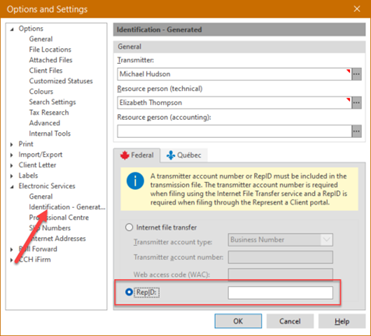
The RepID option has been added to the Electronic Services/Identification > Generated section of the Options and Settings box. This identifier is then used to generate slips (XML) and upload them to the Represent a Client service (RAC).
T5013 returns and slips transmission
The Transmission/T5013 menu has been removed from the program. You can now transmit T5013 returns and slips using the Transmission/Transmit menu.
Advanced virtual agent available in Taxprep
You can now chat with our advanced virtual agent from Taxprep Forms. To do so, click the Virtual Agent button located in the top right corner of the program.
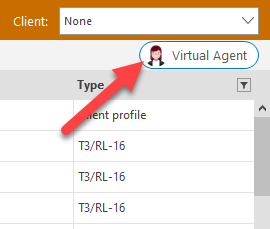
The virtual agent provides:
-
Direct descriptive answers to your queries based on our knowledge base articles, allowing you to benefit from an efficient virtual conversation 24 hours a day, 7 days a week.
-
The ability to chat with a live agent during business hours, so you can discuss your support cases with a person in real time.
-
The possibility of submitting a support case after consulting the list of proposed articles according to the nature of your query, which could provide the answers you are looking for before you even need to submit your support case.
Make sure you register for the Support Platform to access your requests and be able to follow up on them. We also invite you to watch this short video for everything you need to know about how the platform works: How to Manage Your Support Cases.
Installation and Versions
Before installing the program, please read the Installation Procedures which are included with the software package and that are also available in the Installation Procedures Help topic.
Based on the activation key you have entered when installing the program, you will have access to the Gold
Rolling Forward Preparer Profiles
Once you have rolled forward your preparer profiles from last year to the current year, it is important to verify that the options defined with respect to your clients always correspond to your situation for the current season.
Opening Files and Rolling Files Forward
Client files with the .T25 extension
Client files with an extension other than .T25
Rolling forward client files
To
Taxprep Forms 2025 allows you to
Taxprep Forms 2025 also allows you to
Furthermore, Taxprep Forms 2025 allows you to
Attached notes
Note that the attached notes are
Electronic Filing
Taxprep Forms enables you to electronically transmit data from the T5013 return (Silver and Gold versions) and the following slips and RL slips:
|
Slip |
Version |
||
|
Bronze |
Silver |
Gold |
|
|
NR4 |
X |
X |
|
|
T3 |
X |
X |
|
|
T4 |
X |
X |
X |
|
T4A |
X |
X |
X |
|
T4A-NR |
X |
X |
|
|
T4FHSA |
|
X |
X |
|
T4RIF |
X |
X |
|
|
T4RSP |
X |
X |
|
|
T5 |
X |
X |
X |
|
T2202 |
X |
X |
|
|
T5008 |
X |
X |
|
|
T5013 |
X |
X |
|
|
T5018 |
X |
X |
|
|
RRSP |
X |
||
|
RL-1 T4 |
X |
X |
X |
|
RL-1 T4A |
X |
X |
X |
|
RL-1 T4ANR |
X |
X |
X |
|
RL-2 RIF |
X |
X |
|
|
RL-2 RSP |
X |
X |
|
|
RL-2 T4A |
X |
X |
|
|
RL-3 |
X |
X |
X |
|
RL-7 |
X |
X |
|
|
RL-8 |
X |
X |
|
|
RL-11 |
X |
X |
|
|
RL-15 |
X |
X |
|
|
RL-16 |
X |
X |
|
|
RL-18 |
X |
X |
|
|
RL-22 |
X |
X |
|
|
RL-24 |
X |
X |
|
|
RL-25 |
X |
X |
|
|
RL-27 |
X |
X |
|
|
RL-31 |
X |
X |
X |
|
RL-32 |
|
X |
X |
Mandatory electronic filing
The threshold for mandatory electronic filing of information returns for a calendar year has been lowered from 50 to 5 for information returns filed after January 1, 2025. For the latest information about the penalty for not filing information returns over the Internet, go to canada.ca/mandatory-electronic-filing.
The threshold for RL-24 remains at 50.
Information return type reminder
As of January 2025, all returns included in a single submission must correspond to the same information return type. Accordingly, the T5013-FIN and T5013 information returns (slip and summary) must be filed separately.
Online validations by the CRA
Starting January 2026, additional validations will be performed by the CRA once the submissions have been sent. Any errors identified by the CRA during return and slip validations will be detailed in a Return Error Report.
The electronic filing portals will not accept XML files larger than 150 MB in compressed form or exceeding 1 GB when uncompressed.
Electronic transmission of slips to Revenu Québec
The maximum number of XML files that can be transmitted per transmitter number for a given taxation year is 3,599. If the preparer reaches the maximum number of files for a given year, he or she will need to request a new transmitter number. Therefore, it is preferable to group slips together into a single file rather than transmitting one slip per file.
Taxation years covered
Revenu Québec only accepts electronic transmissions of the RL slips for the 2025 and 2026 taxation years. Generally, the CRA does not impose restrictions about the taxation year that can be processed.
Important dates for Internet transmission
Taxprep Forms 2025 complies with the latest Internet transmission requirements issued by government agencies.
- To the CRA, starting on January 12, 2026;
- To Revenu Québec, without any delay (as Revenu Québec’s Internet transmission service has been updated in November 2025).
CRA’s Web Access Code
If you already have a Web access code, you can use it to file your information returns for 2025 and subsequent years.
Getting Help
Benefit from our Advanced Virtual Agent 24/7!
Since January 1, 2025, the customer support teams offer their high-quality service exclusively through digital channels, and no longer offer incoming phone support.
Register for our Support Platform and log in to our virtual agent to find answers, submit a support ticket or chat with a live agent.
For more details about the web ticketing system and best practices, watch the following “How to” videos:
Useful support links:
More than 40,000 articles that answer the technical and tax questions most commonly asked to Support Centre agents.
We offer a wide range of useful videos on how the programs work and their most frequently used features.
Select your program and access the Taxprep help topics. You can also access the help topics by pressing the F1 key from within the program.
Support platform to request online support
Submit questions and requests through the virtual agent, support cases or live chat.
The support site brings together news, release documents, the Knowledge Base, the calendar of product release dates, the Download Centre, and more.
Contact the team that can meet your needs
Contact the team that can best meet your needs directly.
Taxprep e-Bulletin
For your convenience, you are automatically subscribed to the Taxprep e-Bulletin, a free e-mail service that ensures you receive up-to-date information about the latest version of Taxprep Forms. If you want to review your subscription to Taxprep e-Bulletin, visit https://support.cch.com/oss/canada and, in the Newsletters tab, select Subscription Manager.
You can also register to our Support Platform at https://support.cch.com/oss/canada and submit a support ticket to indicate the products for which you want to receive general information or information on our CCH software (Personal Taxprep, Corporate Taxprep, Taxprep for Trusts, Taxprep Forms or CCH Accountants’ Suite).